
Each request in the portal names the evidence your customer needs. This page explains the common types and what makes a document acceptable.
How to read a request
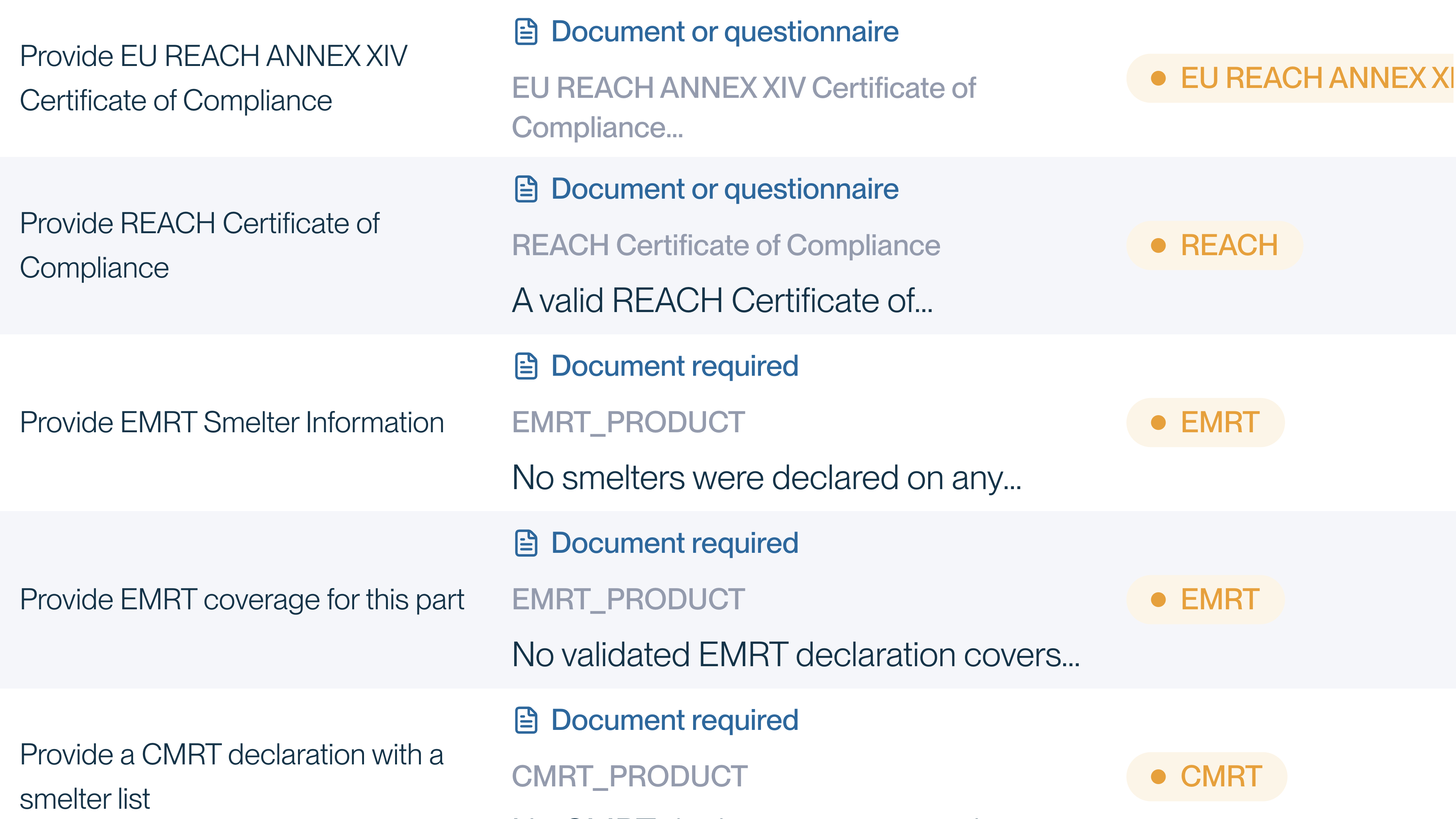
In the requests table, the Details column usually starts with a label:
- Document required: answer by uploading a file.
- Document or questionnaire: upload a file, or type the answers into a form in the portal.
A request with no label accepts a questionnaire only. Select Add Evidence to open it.
 (opens a larger view)
Next comes the name of the evidence and a description of what your customer needs.
Common types of evidence
| Evidence | What it is |
|---|---|
| Certificate of Compliance | A statement from your company saying whether a part meets a regulation, for example a "RoHS Certificate of Compliance". A declaration of conformity or a supplier declaration serves the same purpose. |
| Full Material Disclosure | A breakdown of a part into its materials and substances, with identifiers and amounts. Certivo uses it to check the part against substance limits. |
| RoHS exemption declaration | The RoHS exemption that applies to a part, when the part relies on one. |
| REACH SCIP submission number | The number issued when an article is registered in the EU SCIP database. |
| CMRT or EMRT | The standard conflict minerals and extended minerals reporting templates. In the portal these can appear as codes: CMRT_COMPANY is a CMRT for your whole company, and CMRT_PRODUCT or EMRT_PRODUCT is one that covers the product. |
Your customer decides which regulations and evidence apply to you, so your list may differ.
What makes a certificate acceptable
Requests are raised automatically when a certificate is missing or cannot be used. A certificate is most likely to be accepted first time when it:
- Identifies what it covers. Name the part numbers, or state clearly that it covers everything you supply to this customer.
- States the result clearly. Say whether the part is compliant or not compliant with the regulation.
- Is current. An expired certificate, or one written against an older version of a regulation's substance list, will be asked for again.
If a part is covered by a RoHS exemption, say which one.
Full Material Disclosure
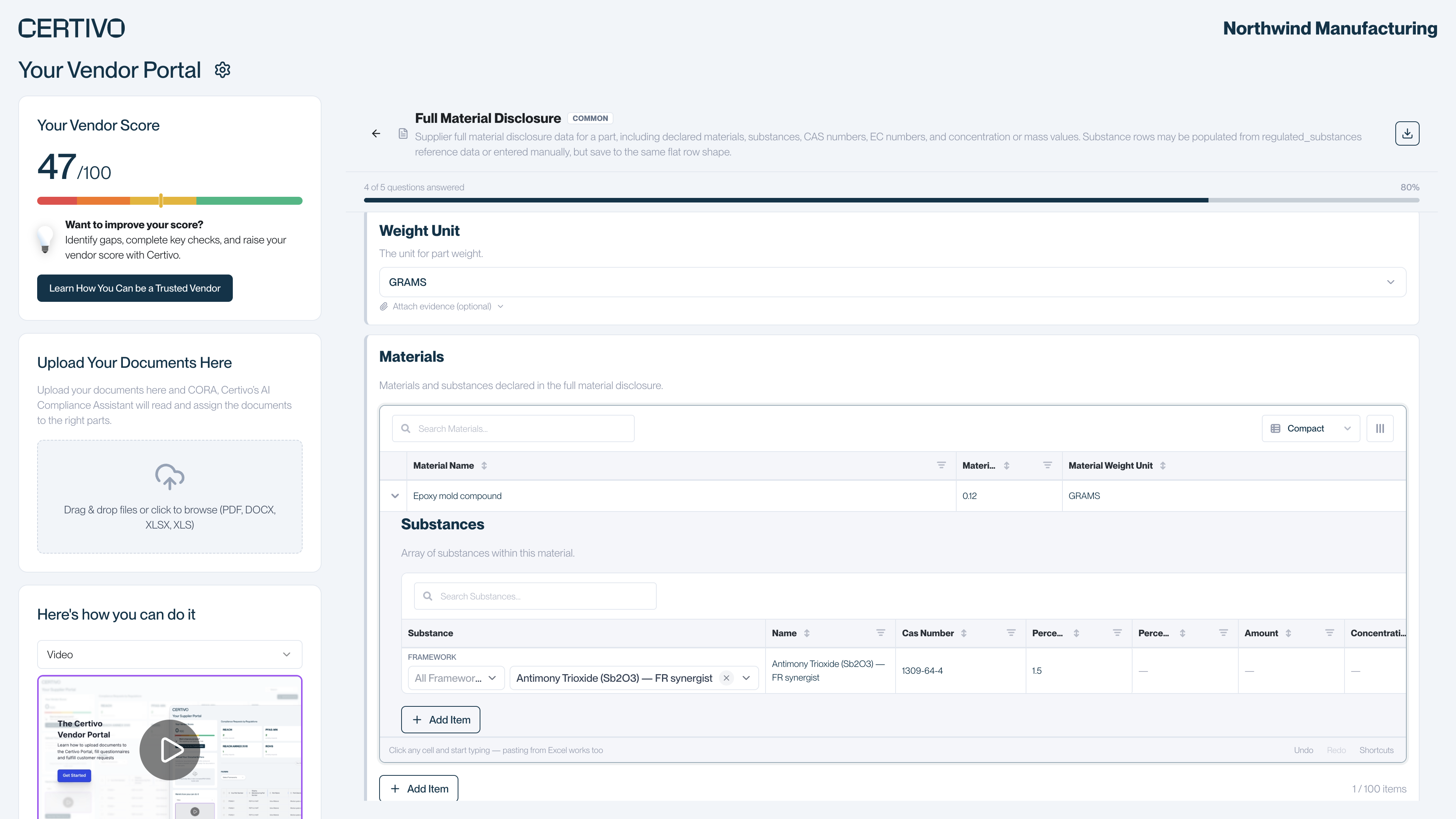
Depending on the request, you can fill in the Full Material Disclosure questionnaire in the portal, upload your own disclosure document, or either.
 (opens a larger view)
The questionnaire asks for:
- A description of the part and its total weight
- Each material in the part, with its weight or its percentage of the part
- Each substance in a material, with its name, CAS number or EC number, and its weight or concentration
You can type the rows or paste them in from a spreadsheet. One disclosure for a part is reused for every regulation that needs it, so you fill it in once.
File formats and size limits
| Where you upload | Formats | Limit |
|---|---|---|
| A request's Upload Document or Upload document button | PDF, DOCX, XLSX, XLS, PNG, JPG. DOC is also accepted when you start from the main page. | 10 files per upload, 50 MB each |
| Upload Your Documents Here and Upload Documents | PDF, DOCX, XLSX, XLS | 50 MB each; the upload box takes 5 files at a time |
PDF, DOCX, XLSX and XLS work everywhere. To send an image, upload it against a specific request. If you have a DOC file, saving it as DOCX or PDF is the safest choice.
If you do not have the document
- If the request shows Document or questionnaire, fill in the questionnaire.
- If only a document is accepted and you cannot provide one, tell your contact at the customer. The portal has no way to mark a request as not applicable.